 PQStat
 DATA QUALITY CHECK
Before starting a statistical analysis, it is worth checking whether the loaded data contains errors that could distort the results – e.g. a numeric column that is in fact an encoded category, values clearly deviating from the rest, non-standard missing-data codes (e.g. -99) mixed in with real values, or single entries that do not fit the rest of the column (e.g. a negative value in an age column).
Data Quality Check scans all columns of the active spreadsheet, computes a concise statistical summary for each of them, and passes that summary to a language model (AI), which points out what looks suspicious in the data and why. The function does not modify the data – it only returns a descriptive list of observations for the user to review.
What is checked
- Numeric columns that look like an encoded category – when a column contains only integers and the number of distinct values is small relative to the number of observations.
- Outliers – detected using the interquartile range (IQR) method: a value is considered an outlier if it lies below \(Q_1-1.5\cdot IQR\) or above \(Q_3+1.5\cdot IQR\).
- Suspicious, repeated extreme values – a value lying far outside the rest of the distribution that appears in the column more than once, which distinguishes it from a single, random deviation and suggests a non-standard missing-data code (e.g. -99, 999).
- Plausibility of values given the column name – e.g. whether an age column contains no negative values, or whether a column that looks like a yes/no question contains no other values. This kind of assessment requires understanding the meaning of the column name, so it is performed exclusively by the AI model based on the summary provided – it is not a rule checked directly by the program.
How to run the check
The data quality check window is opened via the Data\(\to\)Data Quality Check... menu.
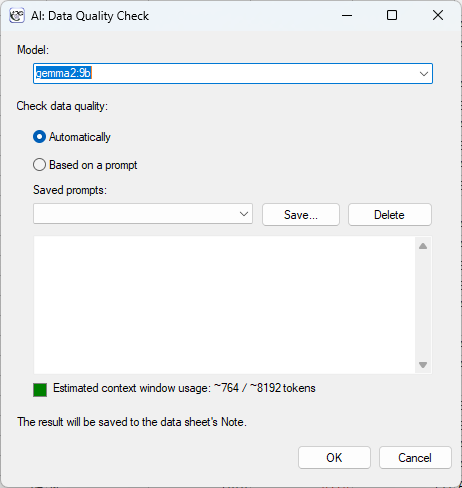
Performing and interpreting the analysis
Example 1. (Data_Quality_Check.csv file)
The file contains 1000 rows (subjects) and 10 columns describing typical medical data: age, sex, height, weight, systolic blood pressure, blood type, presence of a chronic disease, number of visits, psychometric test score, and resting heart rate. Each column deliberately contains a few unusual values – the table below shows what kind of problem each of them represents. After loading the file, we select Data\(\to\)Data Quality Check... and run the analysis with the default model.
| Column | Type of problem | Example values |
| age | outlier / impossible values | \(-2\), \(0\), \(150\), \(199\) |
| sex | value outside the category set (F/M) | "3", "unknown" |
| height_cm | outliers (data-entry error) | \(17.0\) (instead of \(170\)), \(1210.0\) |
| weight_kg | repeated suspicious code | \(-99\) (\(5\times\) in different rows) |
| systolic_bp | outliers | \(255\), \(38\) |
| blood_type | value outside the category set (0/A/B/AB) | "5", "Rh+" |
| chronic_disease | value outside the category set (yes/no) | "female", "2" |
| visit_count | value impossible for a count | \(-2\), \(-1\) |
| psych_test_score | repeated suspicious code | \(999\) (\(4\times\) in different rows) |
| resting_heart_rate | outliers | \(2\), \(410\) |
The result is saved to the data sheet's Note (visible in the project tree), where it can be freely edited or supplemented with your own comments before saving.
Procedure: For each column, the program independently computes: the number of observations, the number of missing values, the number of distinct values, and then – depending on the nature of the column – either numeric statistics (minimum, quartiles, maximum, outliers per the IQR rule) or a list of categories together with their counts. This concise summary (not the raw data) is what is sent to the AI model, together with an instruction to point out only those columns where something genuinely raises concern, and not to guess anything beyond what follows from the summary provided.
Note on performance: Because it is the summary that is analysed, not the full content of the spreadsheet, the size of the request sent to the model stays small even for spreadsheets with many rows – it grows with the number of columns, not the number of observations.