 PQStat
 KERNEL ESTIMATION
One-dimensional kernel estimator
When to use:
The one-dimensional kernel density estimator lets you approximate the shape of a data distribution with a smoothed curve, built in a non-parametric way (without assuming any particular form of the distribution). It is an alternative to the traditional histogram – where a histogram presents the distribution as a set of step-shaped bars (depending on an arbitrarily chosen bin width), the kernel estimator gives a smooth, continuous curve, which lets it reflect the actual shape of the distribution more faithfully.
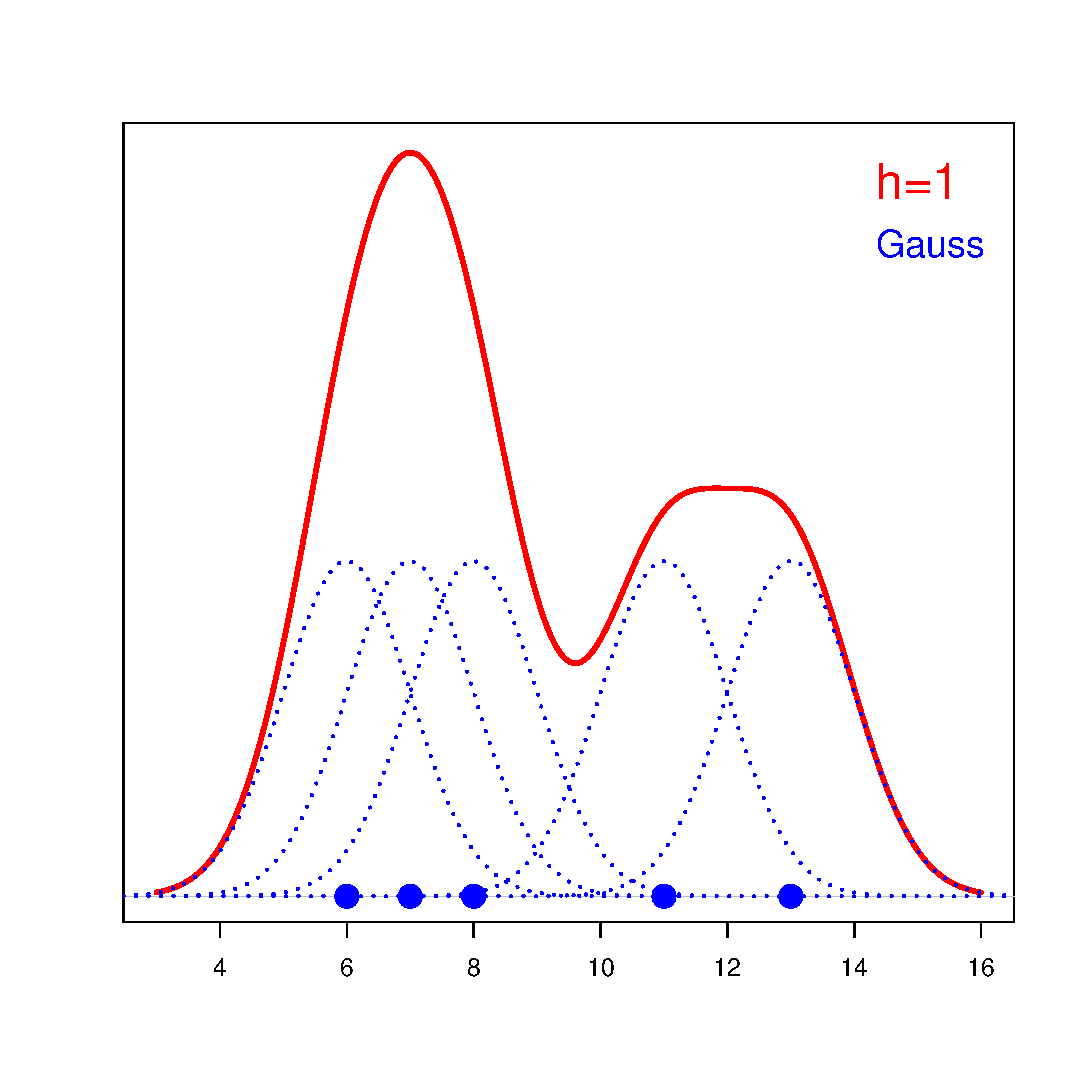
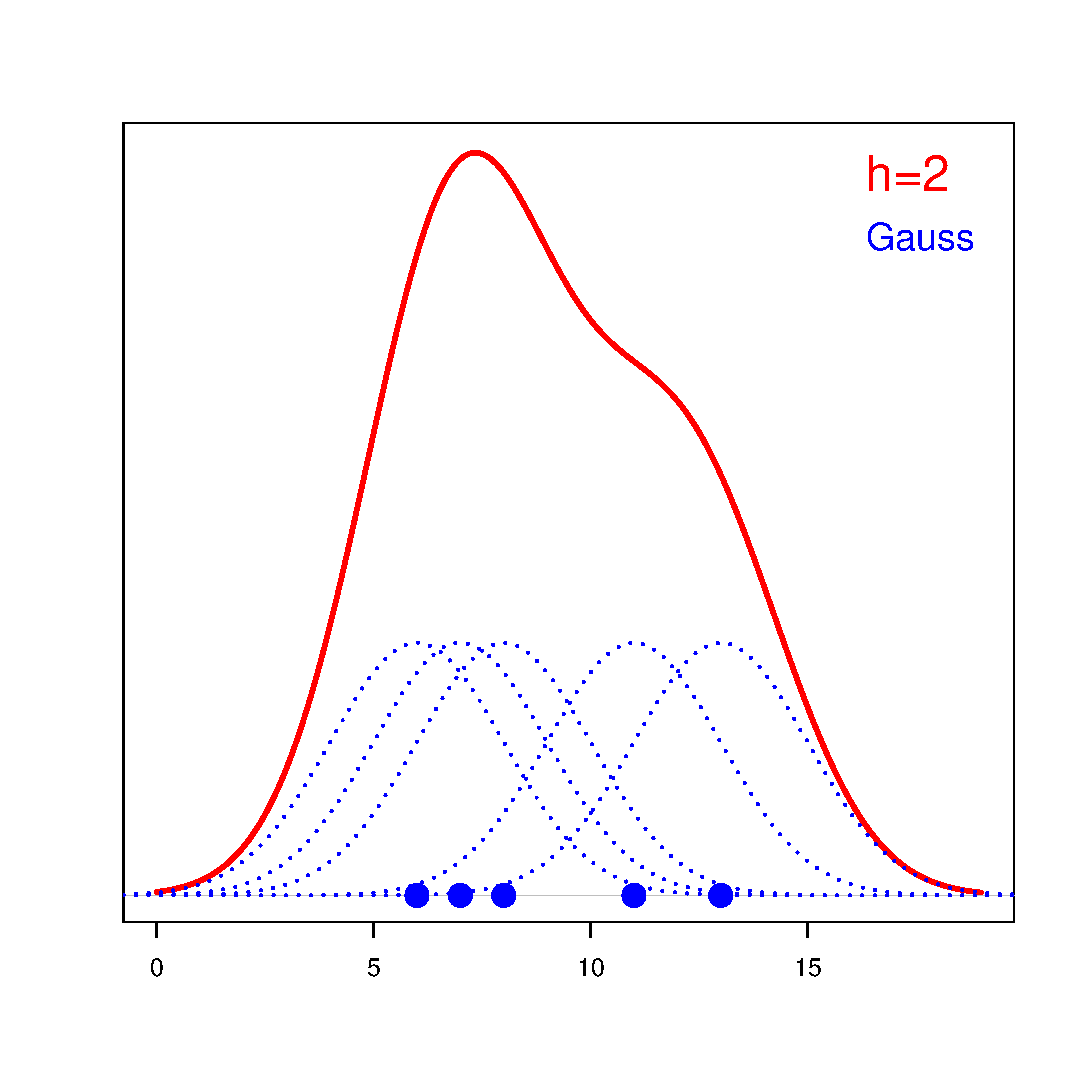
For every point \(x\) in the range of the data, the value of the estimator is determined, i.e. the local density at that point. It is obtained by summing the values of the kernel functions \(K_h(t_i)\) built around the individual observations:
If we assign weights \(w_i\) to the individual cases, a weighted kernel density estimator can be built, defined by the formula:
Definitions of measures
The shape of the resulting curve is influenced by two elements: the choice of the smoothing factor and the choice of the kernel function.
The smoothing factor (\(h\)) (bandwidth) determines the degree of smoothing of the curve – the higher its value, the more strongly smoothed (more "flattened") the resulting estimator is. This factor can be set in several ways:
- User
– any positive value of the smoothing factor, specified by the user.
- User scaled
– a value set so that, when the kernel function is changed, a similar level of smoothing to the one previously chosen for the Gaussian kernel is preserved. Thanks to this rescaling of the factor (Scott, D. W. 1992[151]), it is convenient to switch between different kernels without having to re-select the smoothing. The conversion is based on the standard deviation:
\[ h_2=\frac{\sigma(K_{h_1})}{\sigma(K_{h_2})}h_1 \]- SNR
– a factor determined automatically by Silverman's method (Silverman B. W. 1986[156] pp. 45 and 47) with Jones' correction (Jones M. C. et al. 1996[91]), using the standard deviation from the sample (rather than the population), as proposed by Silverman:
\[ h_{SNR}=1.06sd\cdot n^{1/5} \]For a kernel other than Gaussian, the smoothing factor is additionally rescaled (Scott D. W., 1992[151]).
- SROT
– a factor determined automatically by Silverman's method (Silverman B. W. 1986[156] p. 48) with Jones' correction (Jones M. C. et al. 1996[91]):
\[ h_{SROT}=0.9\min\left(sd, \frac{IQR}{1.34}\right) n^{1/5} \]For a kernel other than Gaussian, the smoothing factor is additionally rescaled (Scott D. W., 1992[151]).
- OS
– a factor determined automatically by the method of Terrell and Scott (Terrell G. R. and Scott D. W. 1985[165], Terrell G. R. 1990[164] p. 470):
\[ h_{OS}=1.144sd\cdot n^{1/5} \]For a kernel other than Gaussian, the smoothing factor is additionally rescaled (Scott D. W., 1992[151]).
The kernel function has less influence on the result than the smoothing factor, but it also shapes the resulting estimator. The kernel is a probability density function built around each data point \(x_i\) – usually a symmetric function, reaching its maximum at the point \(x_i\) and decreasing as the distance \(d_i\) from that point grows. The distance from the point being analysed is modified by the smoothing factor \(h\) according to the formula \(t_i=\frac{d_i}{h}\). Depending on your needs, the kernel function can take the form of the Gaussian, uniform (rectangular), triangular, Epanechnikov or quartic/biweight (fourth-degree) function – the exact formulas can be found in the "For those interested" section.
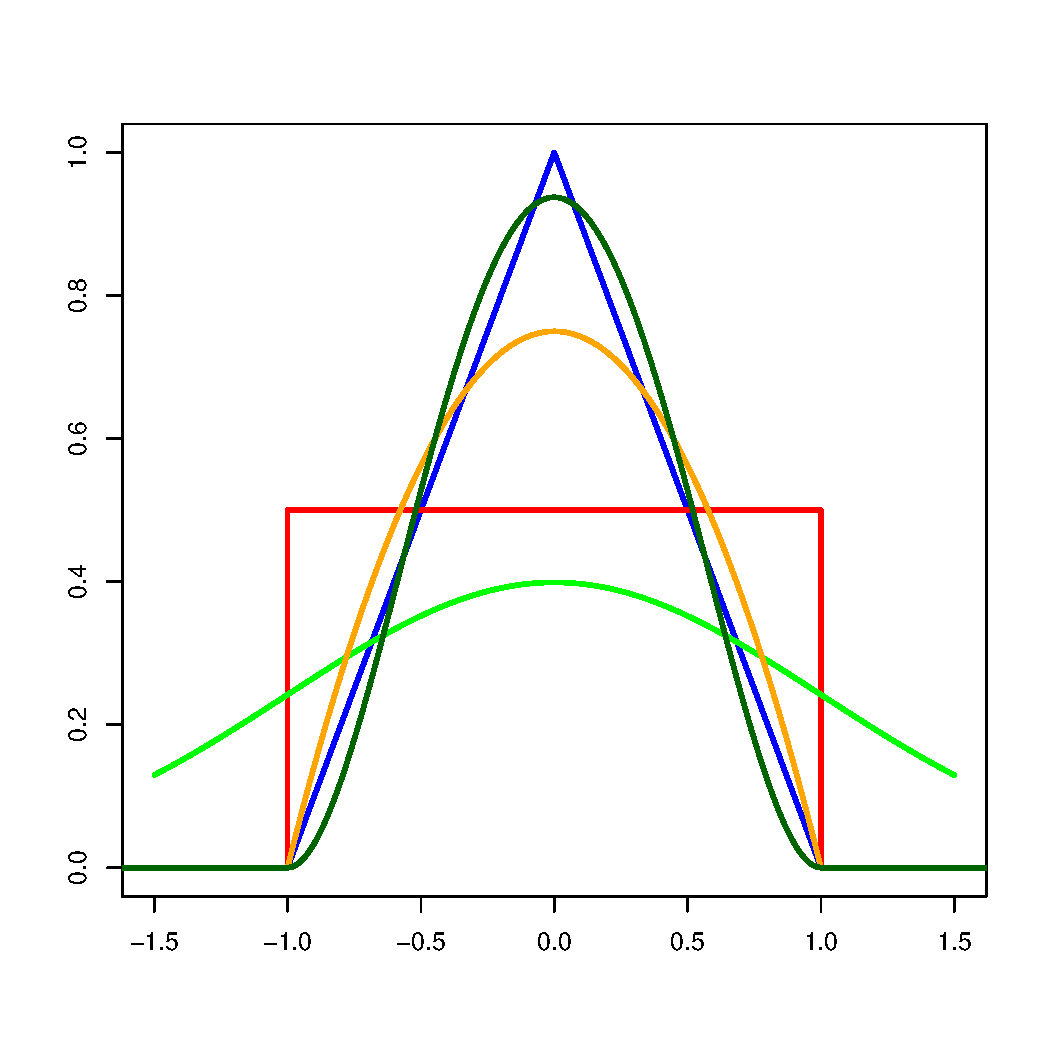 \(-\)Gaussian \(-\)uniform \(-\)triangular \(-\)Epanechnikov \(-\)quartic/biweight
How to set up the analysis
The kernel density estimator is available as a graphical option used in many different analyses describing the distribution of a variable (among others, when creating a histogram). In the settings window of such a plot you can choose the kernel function and the way the smoothing factor is selected (a user value, a scaled user value, or one of the automatic methods: SNR, SROT, OS).
Performing and interpreting the analysis
Example 1. (BMI.pqs file)
Values of the weight-to-height index BMI1 were calculated for a certain group of obese people. Their distribution was first presented using a histogram with values divided into bins 1 BMI unit wide. The same data were also visualised using a kernel density estimator, choosing the Gaussian kernel function and setting the smoothing factors to, respectively: 0.5, 1, 2.
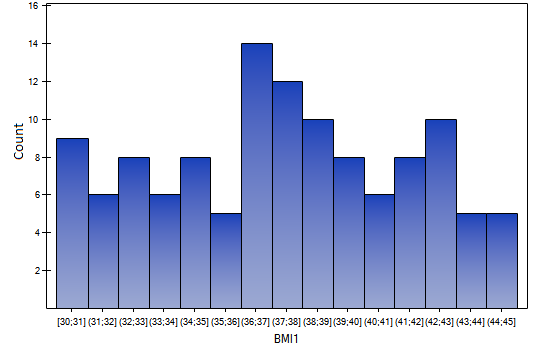
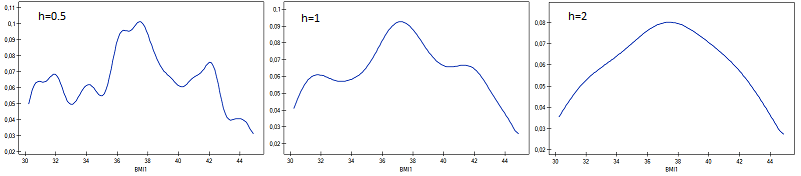
It can be seen that the higher the smoothing factor, the smoother (less "jagged") the resulting density curve, although this can mask finer features of the distribution, e.g. its multimodality. For this data, the smoothing factors suggested by the automatic SROT, SNR and OS methods reach values between 1.4 and 2.
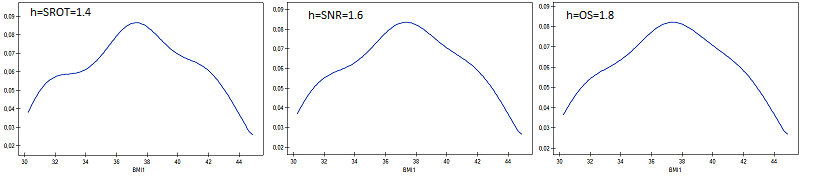
Gaussian kernel function
Uniform kernel function (rectangular)
Triangular kernel function
Epanechnikov kernel function
Quartic or biweight kernel function (fourth degree)