 PQStat
 Validation and prediction for logistic regression
When to use:
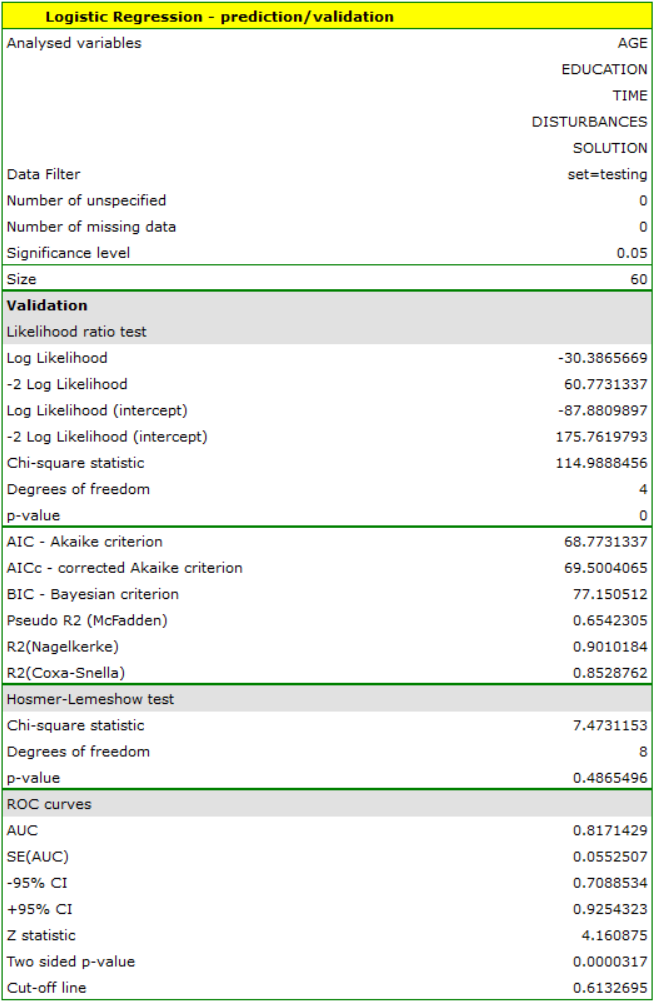
Validation of a model is a check of its quality. It is first performed on the data on which the model was built (the so-called training set), that is, it is returned in the report describing the resulting model. In order to be able to judge with greater confidence how suitable the model is for forecasting new data, an important part of validation is applying the model to data that were not used in estimating the model. If the summary based on the training data is satisfactory, i.e. the calculated errors, \(R^2\) coefficients and information criteria are at a satisfactory level, and the summary based on the new data (the so-called test set) is equally favourable, then it can be concluded with high probability that such a model is suitable for prediction. The test data should come from the same population from which the training data were selected. It is often the case that, before building the model, we collect the data and then randomly split them into a training set, i.e. the data that will be used to build the model, and a test set, i.e. the data that will be used for the additional validation of the model.
Prediction – most often the last stage of regression analysis is the use of the built and previously verified model for prediction. On the basis of new data, the value of the probability predicted by the model is determined, followed by the prediction of the occurrence of the event (1) or its absence (0).
Definitions of measures
The prediction of the occurrence of the event (1) or its absence (0) is based on comparing the value of the probability predicted by the model with the so-called cut-off point. By default, the cut-off point is set to \(0.5\), but the user can change it to any value from the range \((0-1)\), e.g. the value suggested by the ROC curve.
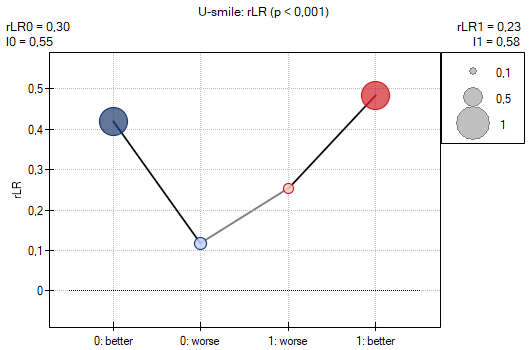
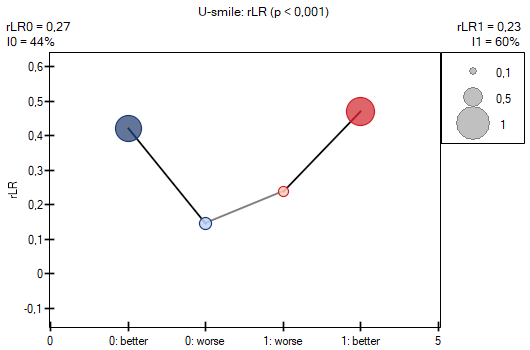
U-smile on the validation set – when, in validation mode, a variable with the observed outcome is indicated, the coefficients and the U-smile plot of the selected model against the null model (the event frequency in the validation set) can additionally be determined. This corresponds to evaluating the model on data independent of the training data: a smile confirms that the model improves the prediction of both classes also outside the training sample, while asymmetry indicates the class for which the improvement does not hold.
How to set up the analysis
Advanced statistics \(\to\) Multivariate models \(\to\) Logistic regression – prediction/validation.
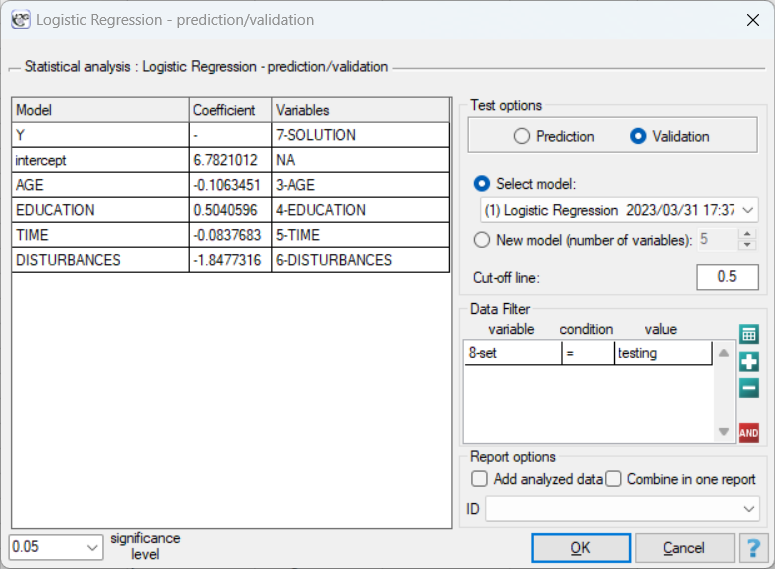
To perform validation or prediction, it is necessary to indicate the model on the basis of which we want to perform it. This can be done on the basis of:
- a logistic regression model built in PQStat – simply select a model from those assigned to the given sheet, and the number of variables and model coefficients will be set automatically; the test set should be in the same sheet as the training set;
- a model not built in PQStat but obtained from another source (e.g. described in a scientific paper we have read) – in the analysis window, enter the number of variables and the coefficients for each of them.
In the analysis window, indicate the new variables that should be used for validation or prediction. Prediction for a single object can be performed together with building the model, that is, in the analysis window Advanced statistics\(\to\)Multivariate models\(\to\)Logistic regression, while prediction for a larger group of new data is performed via the menu Advanced statistics\(\to\)Multivariate models\(\to\)Logistic regression – prediction/validation.
Performing and interpreting the analysis
Example 1. continuation of Example 3 (task.pqs file)
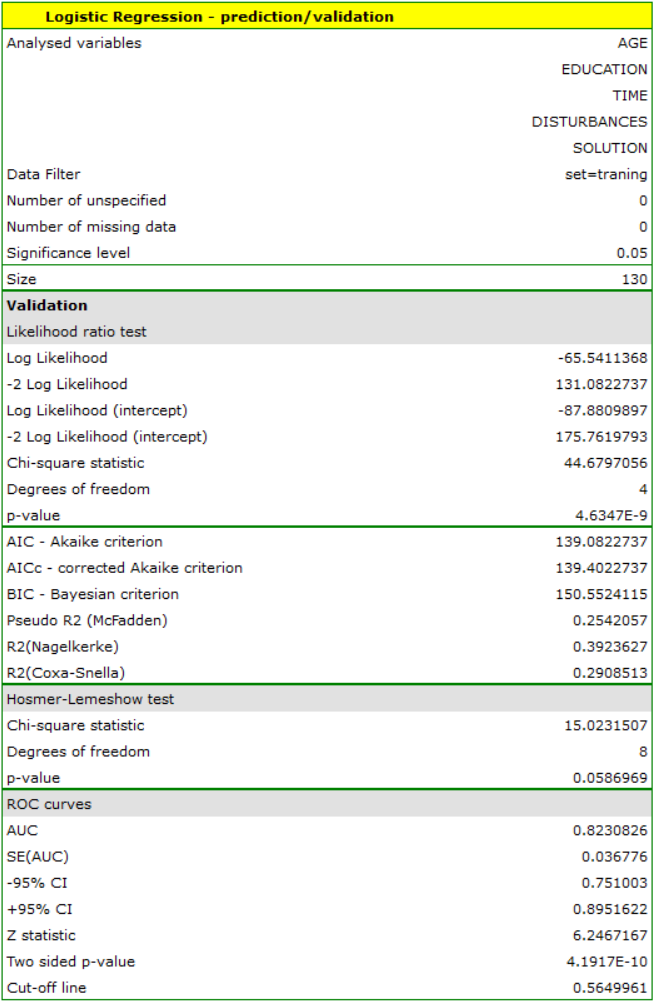
In the experiment studying the ability to concentrate, for the group of 130 people in the training set, a logistic regression model was built based on the following variables:
dependent variable: SOLUTION (yes/no) – information about whether the task was solved correctly or not;
independent variables:
ADDRESSOFRES (1=city/0=village),
SEX (1=female/0=male),
AGE (in years),
EDUCATION (1=primary, 2=vocational, 3=secondary, 4=tertiary),
TIME needed to complete the task (in minutes),
DISTURBANCES (1=yes/0=no).
However, only four variables – AGE, EDUCATION, TIME needed to complete the task, and DISTURBANCES – contribute significant information to the model. We will build the model for the training set data based on these four variables, and then, to make sure it works correctly, we will validate it on the test data set. If the model passes this test, we will apply it to predict outcomes for new individuals. To use the appropriate sets, we set a data filter each time.
For this purpose, we will use the data for three new individuals added at the end of the set. We select the Prediction option, set the filter to the new data set, and use our model to predict whether a given person will solve the task correctly (obtaining a value of 1) or incorrectly (obtaining a value of 0).
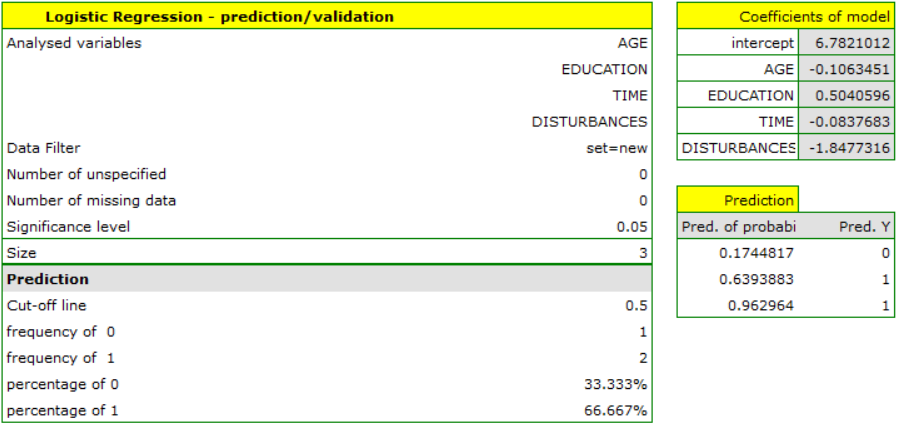
It turns out that the prognosis for the first person is negative, and for the next two, positive. The prognosis for a 50-year-old woman with primary education, solving the test under disturbances in 20 minutes, is 0.17, meaning we predict she will solve the task incorrectly, while the prognosis for a woman 20 years younger is already favourable – the probability of her solving the task is 0.64. The highest probability (equal to 0.96) of solving the task correctly is for the third woman, who solved the test in 10 minutes and without disturbances.
If we wanted to make a prediction based on a different model (e.g. one obtained during another scientific study: SOLUTION\(=6-0.1\cdot\)AGE\(+0.5\cdot\)EDUCATION\(-0.1\cdot\)TIME\(-2\cdot\)DISTURBANCES) – it is enough to select the new model in the analysis window, set its coefficients, and the prediction for the selected individuals can be repeated based on this model.
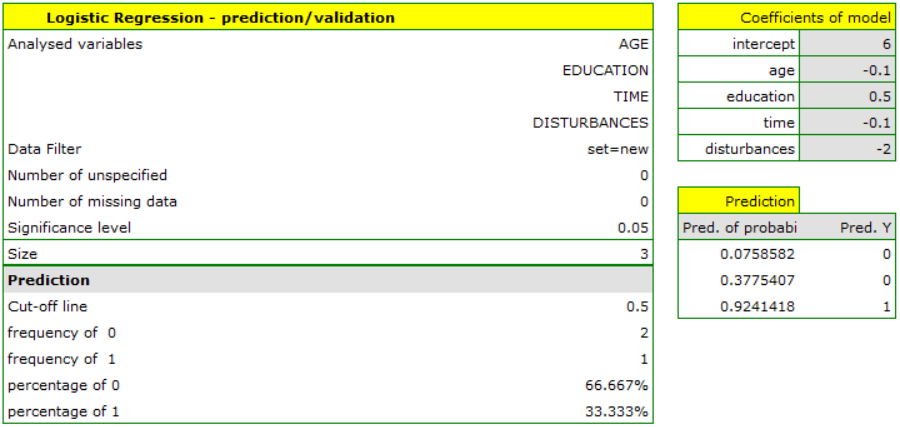
This time, according to the prediction of the new model, the predictions for the first and second individuals are negative, and for the third, positive.