 PQStat
 LOCAL LINEAR SMOOTHING TECHNIQUES
LOWESS
When to use:
LOWESS (locally weighted scatterplot smoothing), also known as LOESS (locally estimated scatterplot smoothing), lets you draw a smoothed trend line through the cloud of points on a scatter plot, built in a non-parametric way (without assuming in advance any particular form of the relationship, e.g. linear or polynomial). It is one of many "modern" modelling methods based on the least squares method, combining the simplicity of linear regression with the flexibility of nonlinear regression. Locally weighted regression estimation was independently introduced in several different fields at the end of the 19th and the beginning of the 20th century (Henderson, 1916[81]; Schiaparelli, 1866[150]). In the statistical literature the method was introduced independently, from various points of view, at the end of the 1970s, among others by Cleveland, 1979[39] – and it is this work on which the method used in PQstat is based.
The basic principle is that a smooth function can be well approximated by a low-degree polynomial (the program uses a linear function, i.e. a first-degree polynomial) in the neighbourhood of any point \(x\). In other words: instead of fitting a single function to all the data at once, a separate local linear function is fitted at every point, built from the neighbouring observations – the closer an observation is to the given point, the greater its influence on the result at that point. The detailed algorithm, together with the formulas, is described in the "For those interested" section.
Kernel smoothing
When to use:
An alternative way of smoothing a scatter plot is kernel smoothing, sometimes called the Nadaraya-Watson estimate (Nadaraya, 1964[126]; Watson, 1964[171]). Like LOWESS, it does not assume any particular form of the relationship in advance – at every point a weighted average of the neighbouring observations is calculated, with the weights assigned according to the kernel function described in the Kernel estimation chapter. The exact formula is given in the "For those interested" section.
The shape of the resulting curve is decisively influenced by the smoothing parameter \(h\) (bandwidth) – the higher its value, the greater the degree of smoothing. This parameter can be set freely (a user value) or selected automatically using one of the methods: SNR, SROT or OS. The choice of kernel function – Gaussian, uniform (rectangular), triangular, Epanechnikov or quartic/biweight (fourth degree) – has a much smaller influence on the result. A description of the individual smoothing parameters and kernel functions can be found in the aforementioned Kernel estimation chapter.
How to set up the analysis
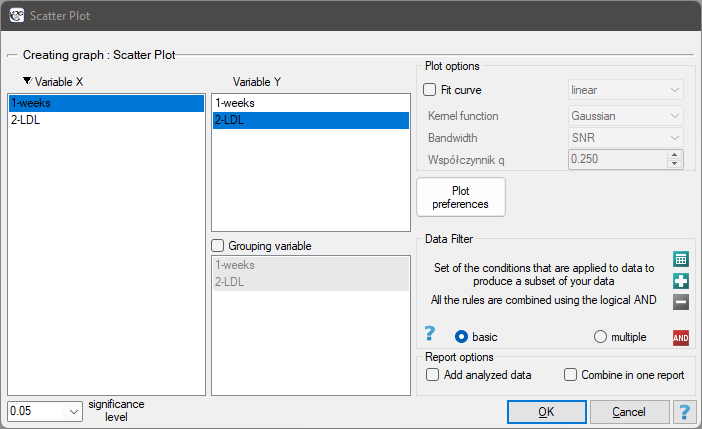
The window with the settings of a scatter plot option with a function fitted using the LOWESS method or by kernel smoothing can be found in various analyses. This plot can also be produced via the menu Plots\(\to\)Scatter plot.
Performing and interpreting the analysis
Example (1) cont. (LDL weeks.pqs file)
The effectiveness of a new therapy aimed at lowering LDL cholesterol levels was studied. 88 people at various stages of the treatment were examined. We will check whether, as the duration of the treatment increases (time in weeks), the LDL cholesterol level decreases and stabilises.
The results were first presented by fitting a straight line indicating the direction of the relationship under study.
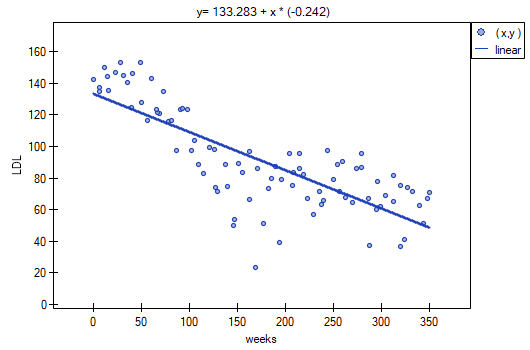
However, this way of presenting the data does not fully reflect the relationship taking place. From the arrangement of the points it can be seen that the relationship is initially decreasing, and after 150 weeks it begins to stabilise. The relationship is presented again, using the LOWESS method and Gaussian kernel smoothing.
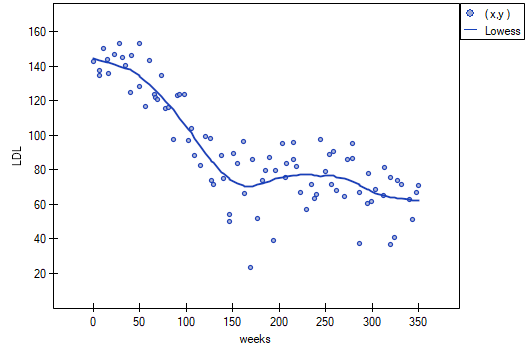
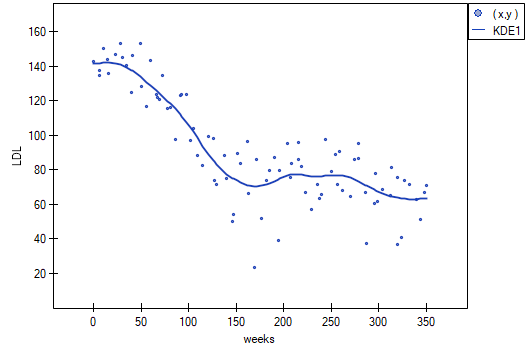
Both methods, i.e. both LOWESS and kernel smoothing, gave similar results and described the data much better, showing an initial decline in LDL followed by stabilisation at a level close to 70 mg/dl.
The LOWESS algorithm
Procedure:
For every point of the dataset we build a window containing the neighbouring elements. How many elements fall into the window is determined by the smoothing parameter \(q\). The higher its value, the smoother the resulting function. If, for example, this parameter is 0.2, then the window will contain about 20% of the data, and these will be used to build the polynomial (here a monomial, i.e. a linear function).
Because the window has to remain symmetric, i.e. the data in the window should lie both above and below the point for which the model is being built, the number of elements in the window should be odd. Therefore, the number of elements obtained from the parameter \(q\) is rounded up to the nearest odd number. This produces a window containing the element \(x_0\) together with the corresponding number \(k(x_0)\) of elements located before it and after it in the ordered dataset.\[ k(x_0)=\frac{roundUpNpar(q*n)-1}{2} \]For example, if the window is to contain 7 elements, it will contain the element \(x_0\) together with the three preceding and three following elements of the sample. The window determined for the first and last elements of the sample is of the same size, but the element in question is not placed symmetrically within it, i.e. not in the middle.
At every point of the dataset a low-degree polynomial (here a linear function) is fitted to the subset of data located in the window. The fit is made using the weighted least squares method, which gives greater weight to points near the point whose response is being estimated, and smaller weight to points further away. In this way a different polynomial formula (here a linear function) is assigned to each point.
The weights used in the weighted least squares method can be set quite flexibly, but points distant from the point in question must have a smaller weight than points nearby. Here the weights proposed by Cleveland are used, the so-called tricube weights\[ w=(1-d^3)^3, \]where the distance \(d\) from the point \(x_0\) was 0 for points outside the designated window, and was given as the actual distance between points but normalised to the interval [0,1] for points located within the window, so that the maximum distances in every window were the same.
- At every point, based on the polynomial formula assigned to it (here a linear function), the value of the function \(\hat{y}_i\) is calculated. Based on the points \(x_i\) and the points \(\hat{y}_i\) estimated by this method, a smoothed function fitted to the data is drawn.
Kernel smoothing
Formulas:
The kernel estimate is a weighted average of the observations within the smoothing window:
where \(K_h(t_i)\) is the kernel function described in the Kernel estimation chapter.