 PQStat
 THE WIZARD
The Wizard is a tool that helps novice users navigate the basic statistics available in the program. It offers hints about the assumptions that should be checked before selecting the appropriate statistical test. The final step of the Wizard is choosing the appropriate statistical test and opening the options window for that test.
The Wizard can be launched via:
- Statistics\(\to\)Wizard,
- the  button on the toolbar.
The Wizard window that opens contains a field for choosing the kind of analysis the user wants to perform. The user can choose:
- Comparison - 1 group - to compare measurement values for 1 population with a value specified by the user. This population is represented by data gathered in 1 column, either in raw form or cumulated into a frequency table.
- Comparison - 2 groups - to compare measurement values between 2 populations. These populations are represented by data gathered in raw form in 2 columns, or cumulated into a contingency table.
- Comparison - more than 2 groups - to compare measurement values between several populations. These populations are represented by data gathered in raw form in several columns.
- Correlation - to check for a relationship between 2 population parameters. These features are represented by data gathered in raw form in 2 columns, or cumulated into a contingency table.
- Agreement - to examine the agreement between several obtained results. These features are represented by data gathered in raw form in several columns, or cumulated into a contingency table.
Once the kind of analysis has been chosen, a graph appears, divided according to the scale on which the studied population features were measured (interval scale, ordinal scale, nominal scale).
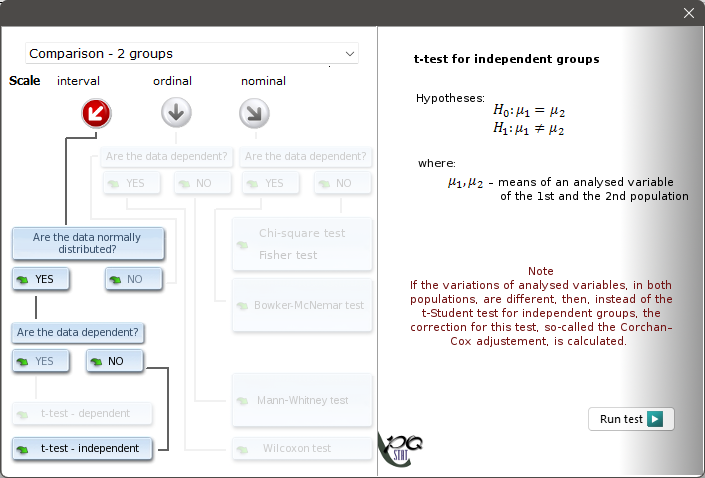
The user moves through the graph by choosing the correct answer to each question asked. Having followed the chosen path through the graph, the user can then run the test that, based on the answers given, is appropriate for solving the statistical problem at hand.
OTHER NOTES
FILE FORMATS
PQS - the default data file format for \(\mathbb{PQ}\)Stat files; it represents all objects created with \(\mathbb{PQ}\)Stat.
PQX - the XML-standard \(\mathbb{PQ}\)Stat file format (UTF-8 encoding); it can be used to represent all objects in the \(\mathbb{PQ}\)Stat program; recommended on systems with a small amount of RAM.