 PQStat
 The data collected by a researcher should first of all be described. Which measures are used for this description depends on how the measurements were made, i.e. on the so-called measurement scale of the variable.
Measurement scales
Correctly determining the type of analysis to be performed depends on the scale on which the collected data are expressed. There are 3 main measurement scales:
Interval scale (ang. interval scale)
A variable is expressed on an interval scale when:- it can be ordered,
- it is possible to calculate by how much one element is greater than another, and this difference has a real-world interpretation. A unit of measurement is usually defined.
Example: the mass of an object [kg], the area of an object [m], time [years], speed [km/h], etc.
Ordinal scale (ang. ordinal scale)
A variable is expressed on an ordinal scale when:- it can be ordered, i.e. the order in which the elements occur matters,
- it is not meaningful to determine the difference or the ratio between two values.
Example: education level, the order of competitors on a podium, etc.
Note! If a variable is expressed on an ordinal scale, then, for calculations to be performed on it correctly, it should be recorded using numbers. These numbers are conventional identifiers denoting the order of the elements.Nominal scale (ang. nominal scale)
A variable is expressed on a nominal scale when:- it cannot be ordered, i.e. there is no ordering that follows from the nature of the phenomenon,
- it is not meaningful to determine the difference or the ratio between two values.
Example: sex, country of residence, etc.
Note! If a variable is expressed on a nominal scale, it may be recorded using text labels. Even if the values of a nominal variable are expressed numerically, these numbers are only conventional identifiers – so no arithmetic operations may be performed on them, nor may they be compared.
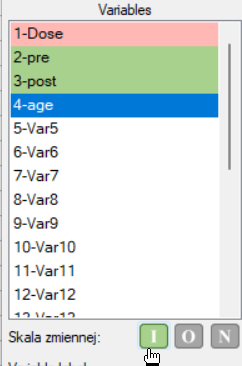
Before starting an analysis, it is recommended to assign a measurement scale to each variable. Doing so will give the variable headers a colour corresponding to that scale, i.e. green = interval scale, yellow = ordinal scale, red = nominal scale. The colour of the variables (and thus their scale) will be visible in the data sheet and in the list of variables in the analysis windows.
A scale can be assigned to a selected variable in the variable options window Codes/Labels/Format or from the context menu on the header of the selected variable.
Quantitative data comprise any information that can be quantified, counted or measured and given a numerical value. Quantitative data include the interval scale and, sometimes, also the ordinal scale.
Qualitative data are descriptive in nature, expressed in linguistic categories rather than numerical values. Qualitative data include the nominal scale and, sometimes, also the ordinal scale.
An ordinal scale that has many objectified categories is quantitative data, e.g. the SF-36 quality-of-life scale (0 to 100 points). If, however, there are so few categories that they can be described in words, e.g. education (primary, secondary, higher), it is qualitative data.
Tables
Frequency tables and empirical distributions of data
When to use:
The foundation of statistical research is determining the empirical distribution, i.e. the distribution of a feature observed in the sample – in other words, checking how often the individual values of the feature recur. Such a distribution is presented in the form of a frequency table or a chart (histogram). For small data sets, frequency tables can present all the data – the so-called point frequency distribution; for larger data sets, so-called interval (class) frequency distributions are created instead.
How to set up the analysis
Statistics \(\to\) Descriptive analyses \(\to\) Frequency tables.
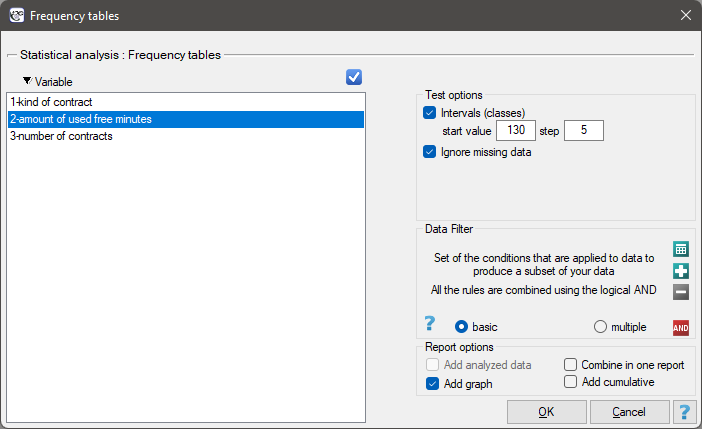
In this window we select the variable to analyse and the analysis options. Depending on the options chosen, the returned result can be sorted treating the variable's values as text or as numbers. If there are empty cells in the analysed column, they may be included in the analysis or omitted. The analysis result appears in the report attached to the data sheet for which it was performed.
If, in addition, we want the data to be illustrated with a column chart or a histogram, we select the Add graph option in the Frequency tables window.
Performing and interpreting the analysis
Example 1. (distribution.pqs file)
A mobile network operator carries out a series of surveys on how customers use the number of "free minutes" included in their subscription. Customers can use up to 190 such minutes each month. The survey was based on a random sample of 200 customers. Among other things, the following information was analysed:
– the type of subscription purchased,
– the number of free minutes used,
– the number of subscriptions registered to a given customer (does not apply to companies).
We want to present the distribution of:
- type of subscription,
- number of free minutes used,
- number of subscriptions registered to private individuals.
We open the Frequency tables window.
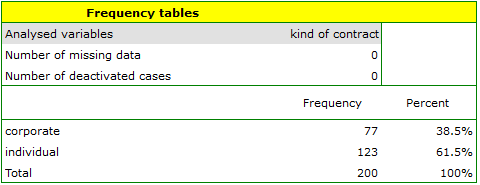
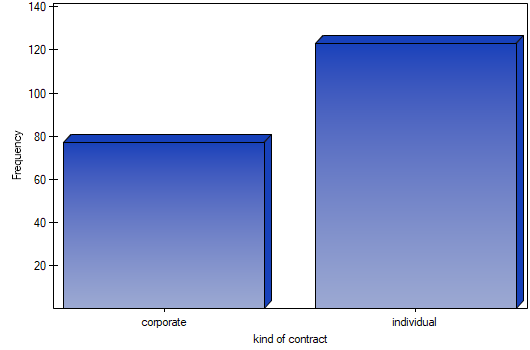
We select the Variable to analyse: "type of subscription" and check the Add graph option. We then confirm the selected settings with the OK button and obtain the result as a report:
We resume the analysis with the
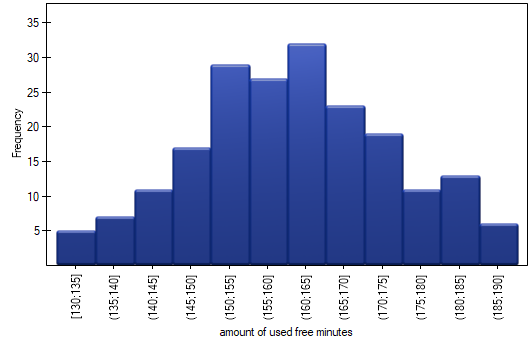
 button. We select the Variable to analyse: "number of minutes used" and check the Intervals (classes) option, setting the start value to, say, 130 and the step to 5. We may also check the Add graph option. We then confirm the selected options with the OK button and obtain the result as a report: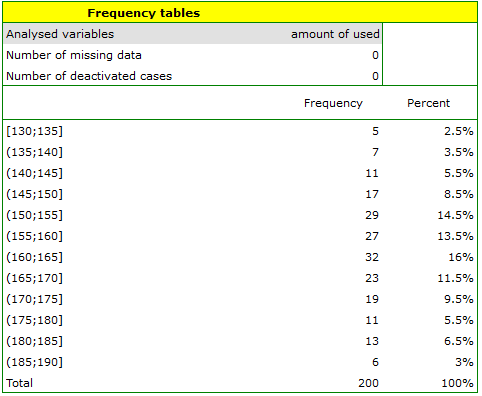
We resume the analysis with the
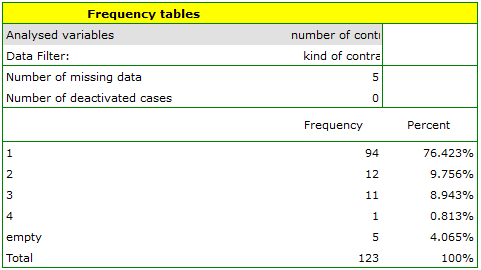
button. We set a filter so that the analysis is performed only for private individuals. We select the Variable to analyse: "Number of subscriptions". Since this variable also contains missing values, the result obtained may or may not include these missing cases in the analysis, depending on the chosen option for ignoring empty cases: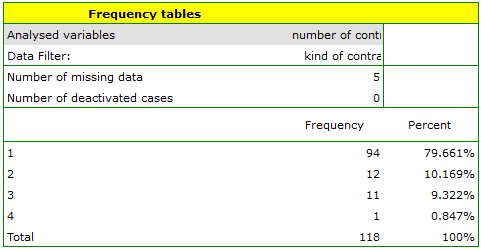
Example 2. (fertilisers.pqs file)
An experiment was conducted to study the microbiological condition of soil under perennial ryegrass cultivation fed with biologically active fertilisers. The soils were fertilised with various microbiological preparations and fertilisers, after which the number of microorganisms present per 1 gram of soil dry matter was calculated. We want to know the frequency of occurrence of actinomycetes per 1 gram of dry matter of nitrogen-fertilised soil – we are interested in how often the studied sample contained 0 to 20 actinomycetes, more than 20 to 40, more than 40 to 60, and so on. In the data sheet we select only the first 54 rows, which meet the assumptions of the analysis (these are the actinomycetes fertilised with nitrogen), and open the Frequency tables window.
In the options window we select the variable to analyse: Number of microorganisms, and then set the class intervals so that the start value is 0 and the step is 20. A message should appear at the top of the window: Data restricted by selection. We confirm the choice with the OK button and obtain the result as a report:
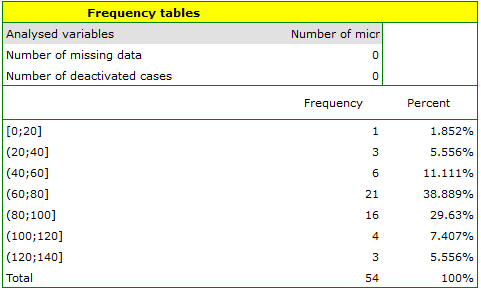
Table report
When to use:
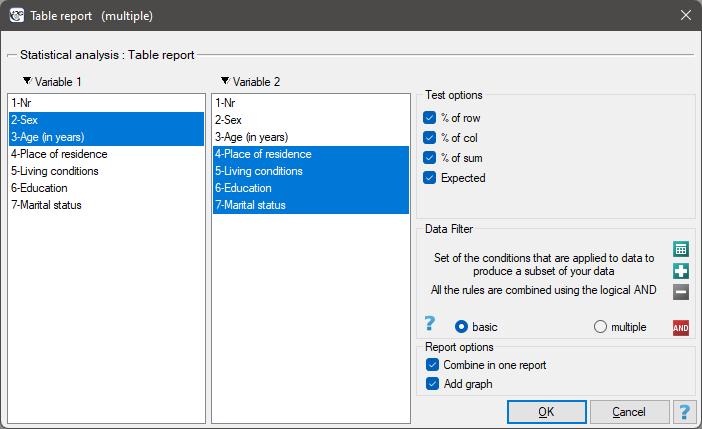
The table report makes it possible to summarise a large amount of data simultaneously in the form of two-way tables (tables of two features). For example, in this way we can present the distribution of age groups by place of residence, education, and so on. Each table is presented as counts within particular categories and can additionally be summarised by calculating row percentages, column percentages, or percentages of the grand total, and it is also possible to determine the table of expected frequencies. For such tables an automatic summary in the form of a column chart is also available.
How to set up the analysis
Statistics \(\to\) Descriptive analyses \(\to\) Table report.
Performing and interpreting the analysis
Example 3. (Tables.pqs file)
We need to summarise, in table form, the distribution of sex by place of residence, social and living conditions, education, and marital status, as well as the distribution of age groups against the same characteristics. As a result we will obtain 4 tables for each pair of features, i.e. 8 tables in total for all the pairs, together with the corresponding charts. Only the breakdown by sex is shown below:
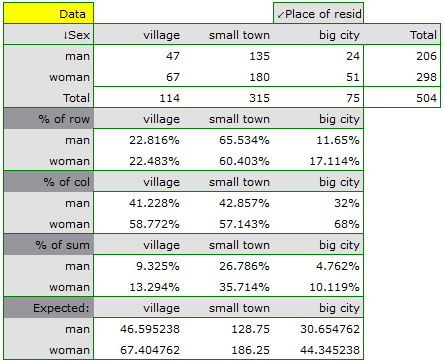
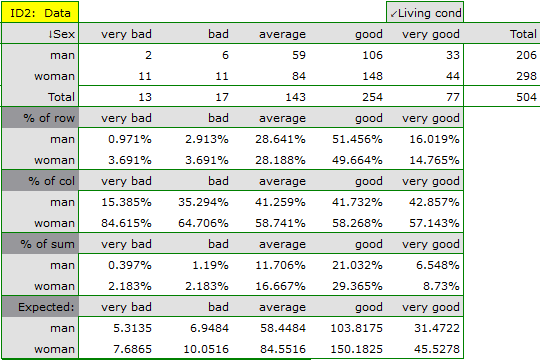
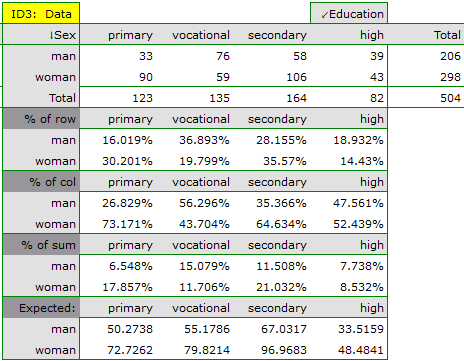
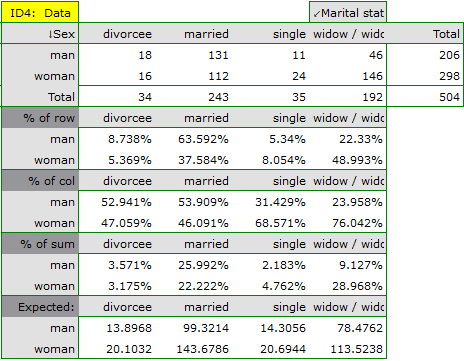
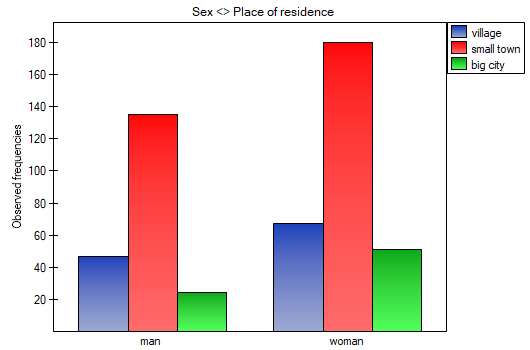
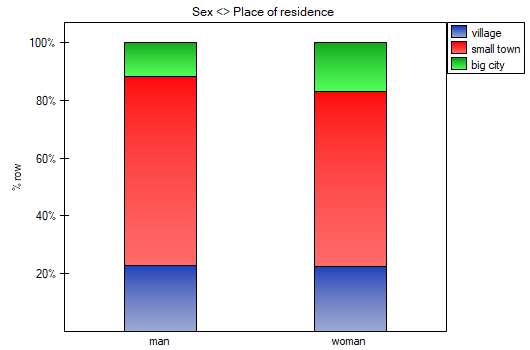
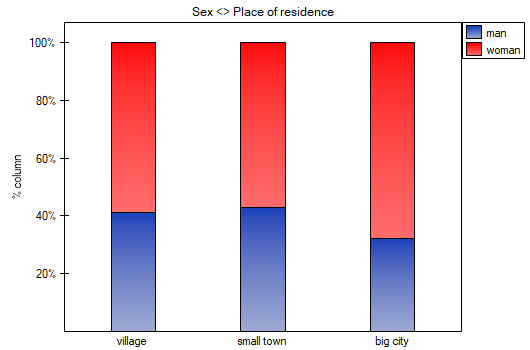
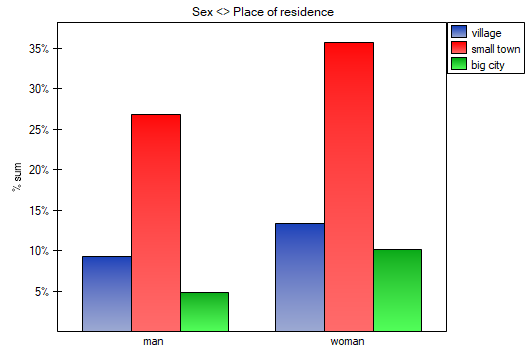
For the breakdown by age group, age categories were first created using codes/labels/format.
Analyses for contingency tables
When to use:
Analyses for contingency tables are used when we want to examine the relationship between two (or more) qualitative features – e.g. whether the type of medication taken is associated with the occurrence of complications. They are calculated on the basis of data collected in a contingency table or directly from data in raw form. It is also possible to transform data from a contingency table into raw form, or vice versa.
Example 4. (sex-education.pqs file)
Consider a sample of 34 people (\(n=34\)). We study 2 features of these people (\(X\)=sex, \(Y\)=education). Sex occurs in 2 categories (\(X_1\)=female, \(X_2\)=male), education in 3 categories (\(Y_1\)=primary + vocational, \(Y_2\)=secondary, \(Y_3\)=higher).
For raw data, when we open the options window of a test, e.g. the \(\chi^2\) test for \(C\times R\) tables, the raw data option will be selected automatically.
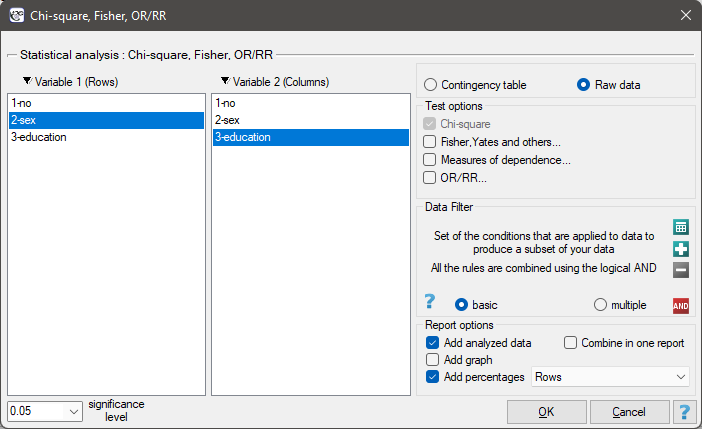
For data already collected in a contingency table, it is a good idea to select that data (the numerical values, without headers) before opening the test window. In that case, once the test window is opened, the contingency table option will be selected automatically, and the selected data will be displayed.
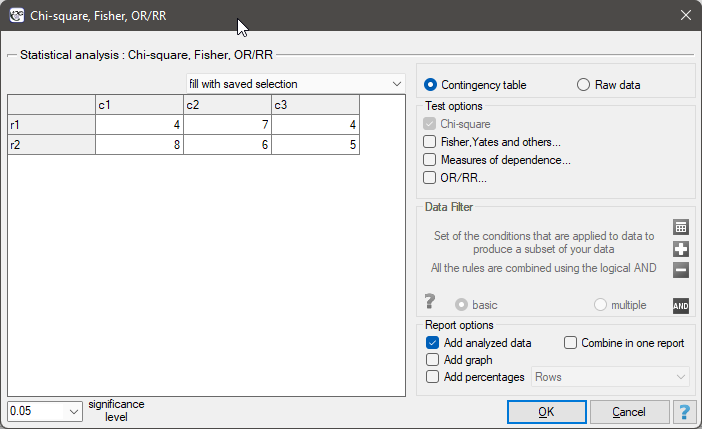
In the test window we can always change the automatically detected setting for how the data are organised, and we can also enter data into the contingency table directly from the window.
Basic tests for contingency tables:
- Chi-square goodness-of-fit test
- Chi-square test for RxC (2x2) tables and its corrections
- Chi-square trend test for Rx2 tables
- McNemar's test, Bowker's test of internal symmetry
- Chi-square test for multidimensional contingency tables
- Cochran's Q ANOVA
- The Mantel-Haenszel method for multiple 2x2 tables
Coefficients for contingency tables:
- Relative Risk and Odds Ratio
- Contingency coefficients: Yule's Q, Phi, Cramer's V, Pearson's C
- Cohen's Kappa coefficient of agreement
- Fleiss' Kappa coefficient
- Sensitivity and specificity, PPV, NPV, LR(+), LR(-), prevalence, accuracy
Definitions of measures
The results report can also include a basic summary of the tables:
Contingency table of observed frequencies \(-\) i.e. data in the form of a contingency table. Such a table shows the distribution of observations for several features (several variables). A table for 2 features (\(X\), \(Y\)), of which the first has \(r\) possible categories and the second \(c\), is shown below (table 1).
Table 1. The \(r\times c\) contingency table of observed frequencies
Frequencies Feature Y observed \(O_{ij}\) \(Y_1\) \(Y_2\) ... \(Y_c\) Total Feature \(X\) \(X_1\) \(O_{11}\) \(O_{12}\) ... \(O_{1c}\) \(\sum_{j=1}^cO_{1j}\) \(X_2\) \(O_{21}\) \(O_{22}\) ... \(O_{2c}\) \(\sum_{j=1}^cO_{2j}\) ... ... ... ... ... ... \(X_r\) \(O_{r1}\) \(O_{r2}\) ... \(O_{rc}\) \(\sum_{j=1}^cO_{rj}\) Total \(\sum_{i=1}^rO_{i1}\) \(\sum_{i=1}^rO_{i2}\) ... \(\sum_{i=1}^rO_{ic}\) \(n=\sum_{i=1}^r\sum_{j=1}^cO_{ij}\) Observed frequencies \(O_{ij}\) (\(i=1,2,\dots,r;\quad j=1,2,\dots,c\)) show the frequency of occurrence of the individual categories for both features.
For such a table to be returned by the program, the option Include analysed data must be selected in the test window. For the data from example (4), the contingency table of observed frequencies is as follows: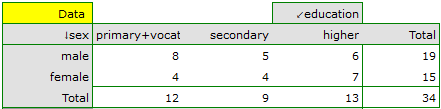
Contingency table of expected frequencies \(-\) for each contingency table of observed frequencies, a corresponding table of expected frequencies: \(E_{ij}\) can be created (table 2) – i.e. the frequencies we would expect in the individual cells of the table if both features were independent of each other (formula in For those interested).
Table 2. The \(r\times c\) contingency table of expected frequencies
Frequencies Feature Y expected \(E_{ij}\) \(Y_1\) \(Y_2\) ... \(Y_c\) Feature \(X\) \(X_1\) \(E_{11}\) \(E_{12}\) ... \(E_{1c}\) \(X_2\) \(E_{21}\) \(E_{22}\) ... \(E_{2c}\) ... ... ... ... ... \(X_r\) \(E_{r1}\) \(E_{r2}\) ... \(E_{rc}\) For the data from example (4), the contingency table of expected frequencies is as follows:

Contingency table of percentages calculated from the column totals. For the data from example (4), this table is as follows:

Contingency table of percentages calculated from the row totals. For the data from example (4), this table is as follows:

Contingency table of percentages calculated from the grand total of rows and columns. For the data from example (4), this table is as follows:

Descriptive statistics
When to use:
The purpose of descriptive statistics methods is to summarise a data set using a few numerical characteristics, e.g. the mean value, the median, or the standard deviation, and to draw basic conclusions and generalisations about the data set on that basis – without this step it is difficult even to begin to understand the data we are dealing with.
How to set up the analysis
Statistics \(\to\) Descriptive analyses \(\to\) Descriptive statistics.
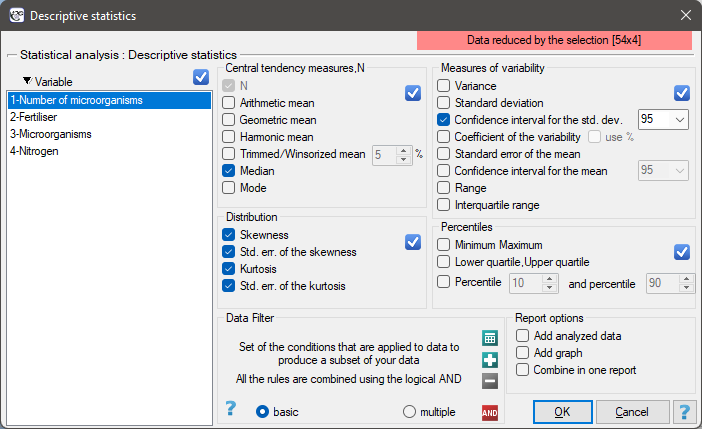
In this window we select the variable to analyse and the analysis options, and check the descriptive statistics measures we are interested in. Individual statistics or whole groups of them can be selected using the  button. We confirm the selection with the OK button. The analysis result appears in the report attached to the data sheet for which it was performed.
If, in addition, we want the data to be illustrated with a box-and-whisker plot, we check the Add graph option in the Descriptive statistics window.
Measures of central tendency
Measures of central tendency are so-called average measures, characterising the mean or typical level of the values of a feature.
Definitions of measures
The arithmetic mean (ang. arithmetic mean) is the best known of the average measures – the sum of all the values divided by their number (formula in For those interested). It is used for the interval scale. For a sample it is denoted by \(\overline{x}\), and for a population by \(\mu\).
The trimmed mean – computed as the arithmetic mean after removing a given percentage of the smallest and largest measurements from the sample, e.g. trimming 5% of the measurements means removing 2.5% of the largest and 2.5% of the smallest values. If the number of measurements to be removed, obtained from this calculation, is not a whole number, it is rounded down to the nearest integer.
The Winsorised mean – computed as the arithmetic mean after replacing the corresponding percentage of extreme measurements with the smallest and largest value remaining in the reduced set of values. If we decide to compute the Winsorised mean by trimming, say, 5% of the measurements, the discarded 5% is replaced by the smallest and largest value determined from the remaining 95% of the measurements. As with the trimmed mean, if converting the percentage of values to be replaced does not give a whole number, it is rounded down to the nearest integer.
The geometric mean (ang. geometric mean) is the \(n\)th root of the product of all the values (formula in For those interested). It is used for the interval scale when the variable has a log-normal distribution (the logarithm of the variable has a normal distribution).
The harmonic mean (ang. harmonic mean) is the number of observations divided by the sum of the reciprocals of the individual values (formula in For those interested). It is used for the interval scale.
The median (ang. median)
In an ordered data set, the median is the value that divides the set into two equal parts. Half of all the observations lie below, and half above, the median.
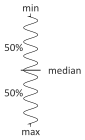
The median can be used for the interval scale and the ordinal scale.
The mode (ang. mode)
The mode \(-\) is the value that occurs most frequently among the measurements obtained. The mode can be used for any measurement scale.
Other measures of location
Quartiles (ang. quartiles), deciles (ang. deciles), centiles (ang. centiles) are values that divide an ordered data set into equal parts – similarly to the median, but into more than two parts.
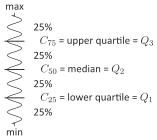
Quartiles (\(Q_1\), \(Q_2\), \(Q_3\)) divide an ordered series into 4 equal parts, deciles (\(D_i\), \(i=1,2,...,9\)) into 10 equal parts, and centiles (percentiles: \(C_i\), \(i=1,2,...,99\)) into 100 equal parts. The second quartile, the fifth decile and the fiftieth centile are all equal to the median. These measures can be used for the interval scale and the ordinal scale.
Measures of dispersion
Knowledge of measures of central tendency is not enough to characterise the structure of a statistical collection – the group under study may show varying degrees of variability in the feature examined. Measures are therefore needed that allow us to determine the spread of the data.
Assumptions
- measurement on the interval scale – measures of dispersion are based on distances between points, so they are not computed for the ordinal or nominal scale.
Definitions of measures
The range (ang. range) – the difference between the largest and smallest value in the sample (formula in For those interested). The interquartile range (\(IQR\)) is the analogous difference between the upper and lower quartile.
Ranges for the percentile (decile, centile) scale. Ranges between percentiles are one of the measures of dispersion – they indicate the percentage of all observations whose value lies between the selected percentiles.
Variance (ang. variance) \(-\) measures the degree of dispersion of the measurements around the arithmetic mean. It is calculated slightly differently for a sample and for an entire population (formulas in For those interested). Variance is always positive, but it is not expressed in the same units as the measurements.
Standard deviation (ang. standard deviation) \(-\) like variance, measures the degree of dispersion of the measurements around the arithmetic mean, but – unlike variance – is expressed in the same units as the data (it is the square root of the variance). The higher the value of the standard deviation (or the variance), the more diverse the group is with respect to the feature under study.
The coefficient of variation (ang. coefficient of variation)
The coefficient of variation, like the standard deviation, allows us to assess the degree of homogeneity of the group under study (formula in For those interested). It is a dimensionless quantity, which makes it possible to compare the variability of several groups with respect to the same feature, and of the same group with respect to several different features (expressed in different units). It is generally assumed that if the coefficient \(V\) does not exceed 10%, the features show statistically insignificant variability.
Standard errors (ang. standard errors) \(-\) these are not measures of dispersion of the measurement results, but rather indicate the degree of precision with which we can determine the values of population parameters from their estimators calculated from the sample. The most commonly used standard error is the standard error of the mean (ang. standard error of the mean, SEM) – formula in For those interested.
Other distribution attributes
Skewness, also called the coefficient of asymmetry (ang. skewness)
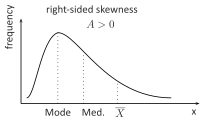
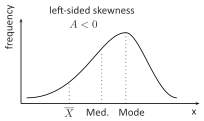
This measure indicates how much the distribution of the data differs from a symmetric distribution. The closer the value of the asymmetry coefficient is to zero, the more symmetrically the data are distributed around the mean. This coefficient usually lies within the range [-1, 1], although for particularly high asymmetry it may fall outside this range. Positive values indicate right-sided skewness (a longer right "tail"), while negative values indicate left-sided skewness (a longer left "tail"). The formula for skewness can be found in For those interested.
 |  |
Kurtosis, also called the coefficient of concentration (ang. kurtosis)
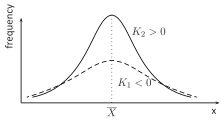
This measure indicates how closely the spread of the data around the mean resembles the spread of data in a normal distribution. The higher the value of kurtosis above zero, the more sharply peaked the studied distribution is compared with the normal distribution; the lower the value below zero, the flatter the distribution is compared with the normal distribution. The formula for kurtosis can be found in For those interested.
Performing and interpreting the analysis
Example 5. (fertilisers.pqs file)
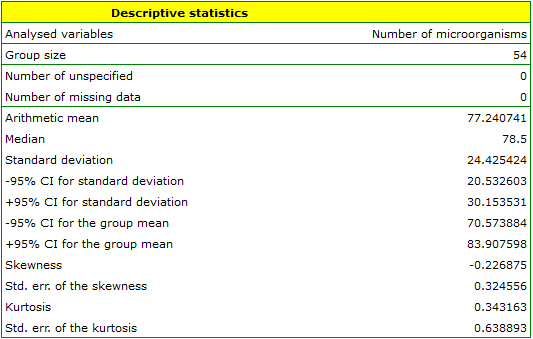
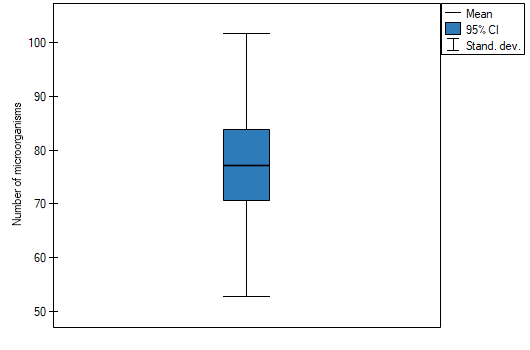
In an experiment on fertilising soil with various microbiological preparations and fertilisers, the number of microorganisms present per 1 gram of soil dry matter was calculated. We want to determine descriptive statistics for the number of actinomycetes in the sample fertilised with nitrogen, and to illustrate the results with a box-and-whisker plot. In the data sheet we select only the first 54 rows, which meet the assumptions of the analysis (these are the actinomycetes fertilised with nitrogen), and open the Descriptive statistics window.
In the descriptive statistics options window we select the variable to analyse: Number of microorganisms, and then the procedures we want to perform (e.g. the arithmetic mean together with its confidence interval, the median, the standard deviation together with its confidence interval, and information on the skewness and kurtosis of the distribution together with their errors). A message should appear at the top of the window: Data restricted by selection. To have a chart included in the report as well, we check the Add graph option and choose the box-and-whisker plot type we are interested in. We confirm the choice with the OK button and obtain the result as a report:
Descriptive summaries
When to use:
Descriptive summaries provide a quick way to prepare a report presenting a description of the data, ready to be inserted directly into a research paper. It is a tool that makes it easier to gather all the basic forms of data description in one place.
How to set up the analysis
Statistics \(\to\) Descriptive analyses \(\to\) Descriptive summaries.
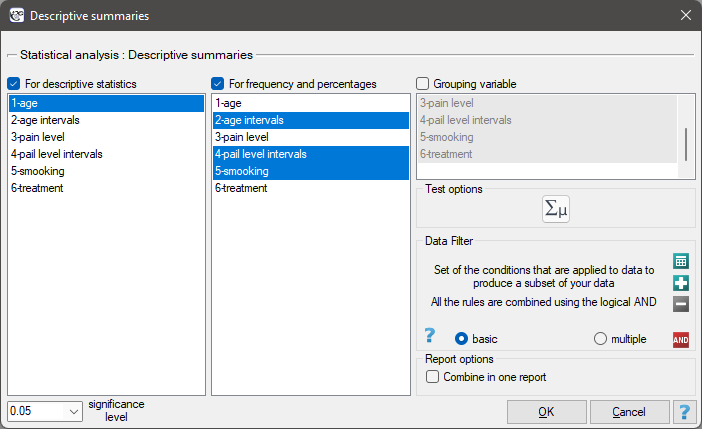
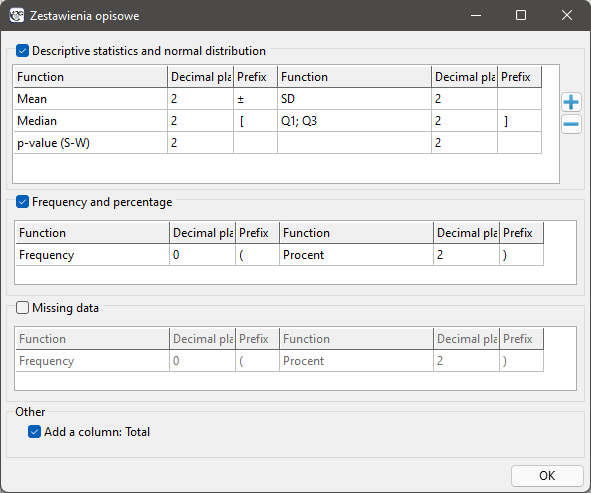
Depending on how the measurements were made, one of three types of measure is most often used to describe a variable:
- mean \(\pm\) standard deviation, abbreviated \(\overline{x}\pm sd\)
- median [lower quartile; upper quartile], abbreviated \(Me [Q_1; Q_3]\), or median [min; max], abbreviated \(Me [min; max]\)
- count (percentage) of individual categories, abbreviated \(n (\%)\)
Depending on the needs and whether additional assumptions are met:
- on the interval scale, data can be described using any measure – researchers are also often interested in checking whether such data are normally distributed,
- on the ordinal scale, we can use medians (with quartiles or the smallest and largest value) or the counts and percentages of individual categories,
- on the nominal scale, only the counts and percentages of individual categories are available.
Performing and interpreting the analysis
Example 6. (Descriptive summaries.pqs file)
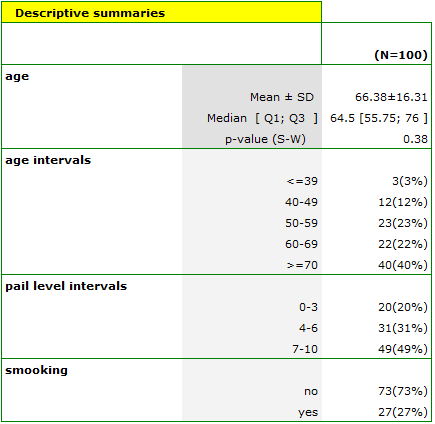
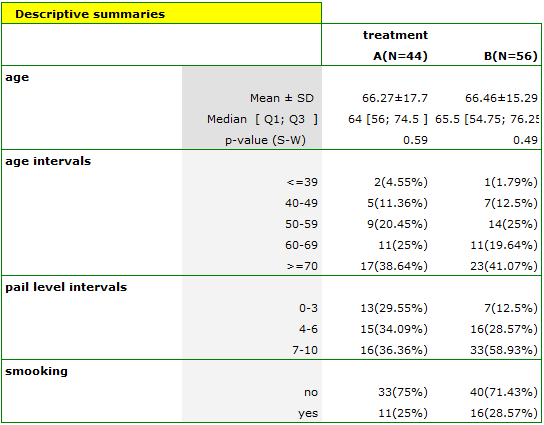
An example way of describing data is shown by the resulting report summarising age, perceived pain level, and smoking status. These data are summarised in the first table, describing all 100 people, and in the second table, broken down by treatment method.
Formulas
Contingency table of expected frequencies
The arithmetic mean
where \(x_i\) are the successive values of the variable, and \(n\) is the sample size.
The geometric mean
The harmonic mean
The range
where \(x_i\) are the values of the variable being studied.
where \(Q_1, Q_3\) are the lower and upper quartile.
Variance (ang. variance)
- sample variance:
- \[ sd^2=\displaystyle{\frac{\sum_{i=1}^{n}(x_i-\overline{x})^2}{n-1}}, \]
where \(x_i\) are the successive values of the variable, \(\overline{x}\) is their arithmetic mean, and \(n\) is the sample size.
- population variance:
- \[ \sigma^2=\displaystyle{\frac{\sum_{i=1}^{N}(x_i-\mu)^2}{N}}, \]
where \(x_i\) are the successive values of the variable, \(\mu\) is their arithmetic mean, and \(N\) is the population size.
Standard deviation (ang. standard deviation)
- sample standard deviation:
- \[ sd=\sqrt{sd^2}, \]
- population standard deviation:
- \[ \sigma=\sqrt{\sigma^2}. \]
The coefficient of variation
where \(sd\) is the standard deviation and \(\overline{x}\) is the arithmetic mean.
The standard error of the mean (ang. standard error of the mean)
Skewness
where:
\(x_i\) \(-\) the successive values of the variable,
\(\overline{x}\), \(sd\) \(-\) the arithmetic mean and standard deviation of \(x_i\), respectively,
\(n\) \(-\) the sample size.
Kurtosis
where:
\(x_i\) \(-\) the successive values of the variable,
\(\overline{x}\), \(sd\) \(-\) the arithmetic mean and standard deviation of \(x_i\), respectively,
\(n\) \(-\) the sample size.